 XLikes
Free Chrome extension for X
See every tweet you've liked from someone, right on their profile.
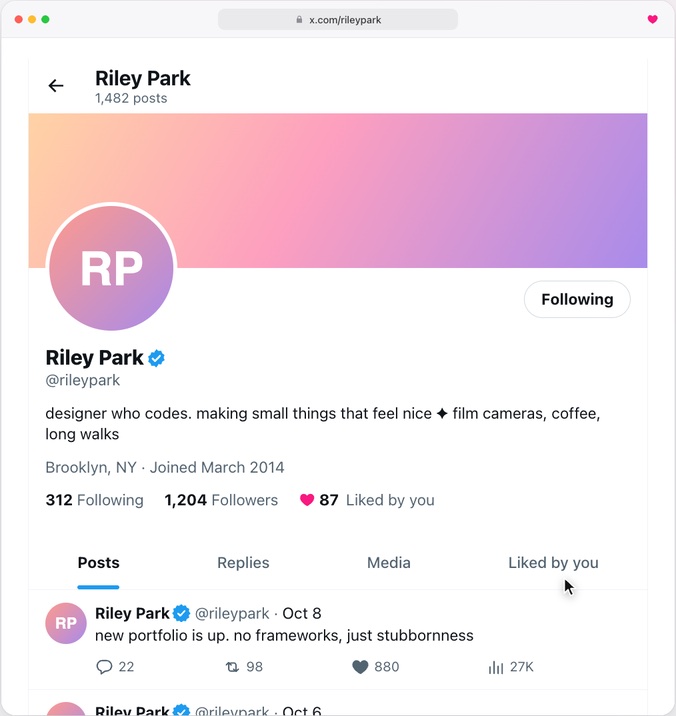
XLikes adds a “Liked by you” tab to every X profile, next to Posts and Replies. Open anyone's page and there's everything of theirs you've ever liked, searchable, going back years.
Add to ChromeFree. Works on x.com and twitter.com.
XLikes at a glance
- What it is
- A Chrome extension that adds a “Liked by you” tab and count to every X profile
- Works on
- Chrome on a desktop or laptop, on x.com and twitter.com
- Price
- Free. No ads, no account, no upgrades.
- Older likes
- Imported from the archive X lets you download
- New likes
- Saved on their own as you browse. No scraping.
- Search
- On each profile, or across all your likes by post or by person
- Privacy
- Everything stays on your computer. No analytics, nothing sent to me.
- Current version
- 3.0.1
- Made by
- Henry, an independent developer. Not affiliated with X.
How to see the tweets you've liked from someone on X
- Add XLikes from the Chrome Web Store.
- Request your archive on X: Settings → Your account → Download an archive of your data. X emails you when it's ready, which can take a day or more.
- Click the XLikes icon in your toolbar and drop the archive in. The whole .zip works, or just data/like.js from inside it.
- When the progress pill asks, let XLikes look up who wrote each like. The archive only has the post and its ID, not the author.
- Open any profile and click Liked by you.

You can skip the archive if you only care about new likes. XLikes saves posts you like from the moment it's installed, just by reading what X already loads on the page. The archive is how you get the years before that.
What else it does
- Shows a heart and a count next to Following and Followers, so you can see how many of someone's posts you've liked at a glance.
- Search inside the Liked by you tab, and sort by date.
- Videos and GIFs play right in the card.
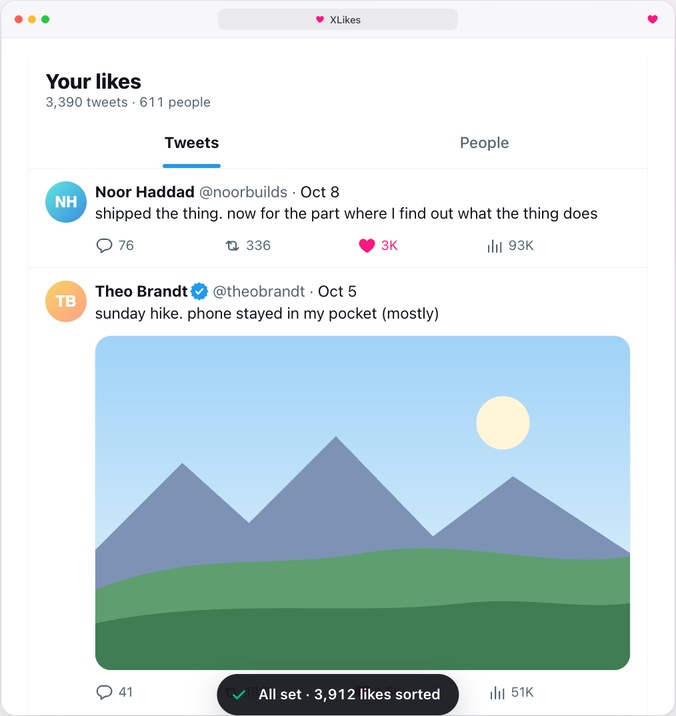
- Click the toolbar icon to see all your likes in one place. The People view shows whose posts you like the most.
- Matches your X theme, including Lights out.
- Export everything as JSON, or delete it all, any time.
What XLikes doesn't do
- It can't see likes you made before installing it until you import your archive.
- It doesn't show anyone else's likes. Only yours.
- It doesn't sync between computers. Your likes live in Chrome on the computer you imported them on.
- It isn't in the X app on your phone. Desktop Chrome only.
- It doesn't like, unlike or post anything for you. It only reads.
- If X changes its site, the tab can break until I ship a fix.
FAQ
Is XLikes free?
Yes. There's nothing to buy, no ads and no account.
Can X show me the posts I've liked from one person?
Not on its own. Your Likes tab on X is one long list of everything, newest first, with no search and no way to filter by person. XLikes adds that. I wrote up every way to find them, including doing it without an extension.
Can other people see what I've liked?
No. X made likes private in 2024, so only you can see yours. XLikes keeps everything on your computer and only shows you your own likes.
Why do I need my X archive?
It's the only complete list of your likes that X gives you. Without it, XLikes only knows about likes it sees after you install it.
Why does XLikes ask to contact cdn.syndication.twimg.com?
That's X's public embed service, the same thing any website uses to show an embedded tweet. Your archive only has each post's ID and text, so XLikes sends the ID there to find out who wrote it. Only the ID is sent, and only after you allow it.
Does it work on twitter.com?
Yes, both x.com and twitter.com.
Can I export or delete my likes?
Yes. Click the XLikes icon, then the ⋯ menu, to export everything as JSON or remove it all. Uninstalling XLikes deletes everything too.
Is this the same as “XLikes - Likes Archiver”?
No. That's a different extension by a different developer, with paid tiers. This XLikes is free and is the one that adds a Liked by you tab to X profiles.
Is XLikes made by X?
No. It's an independent extension and isn't affiliated with or endorsed by X Corp.
Something's not working. Who do I tell?
Email me at h@henrys.place. Tell me what you were doing and what happened. X changes its site a lot, so a quick note helps me fix things fast.
Updated